 4min
4minNTPro features a comprehensive alert system designed to help users monitor market and platform performance in real time. Alerts not only track market events and client activity, but also notify users about critical changes in trading settings and risk parameters. This enables traders and risk managers to respond quickly to changing conditions and reduce potential losses.
Alerts are divided into two categories:
- Business alerts are related to limits, margin requirements, and trading restrictions. These alerts help traders and risk managers maintain control over key financial indicators.
- Technical alerts notify users about system or connection issues, allowing problems to be resolved quickly and ensuring uninterrupted trading operations.
All alerts can be configured with sound notifications or displayed as pop-up messages only.
Types of Alerts and Their Purpose
Limit Utilization Alerts
The system sends notifications when a predefined percentage of a trading limit is reached, such as 80%, 90%, or 100%. These alerts encourage clients to take timely action before trading operations are blocked or losses occur.
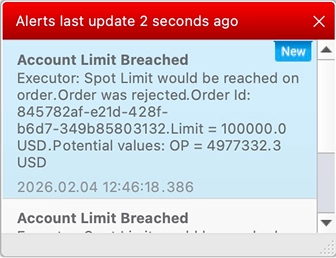 Example of a Limit Utilization Alert
Trading Timeouts
In the Trading Timeouts section, managers can configure trading cooldown periods for clients. These timeouts restrict the placement of new orders for a specified period after a trade is executed.
This functionality is especially useful for preventing excessive trading activity, reducing system load, and limiting unnecessary risk — particularly when aggressive trading strategies are used.
Price Level Alerts
Using the Price Levels window in both the manager and client terminals, users can configure alerts for price breakouts. This allows traders to react instantly to market movements without continuously monitoring quotes.
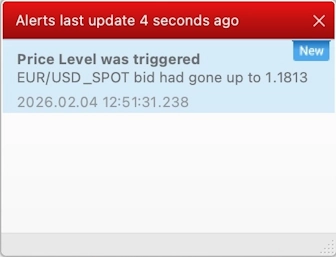 Example of a Price Level Alert
Margin Call
For margin accounts, users can configure notifications for critical margin utilization levels. The percentage of Margin Used that triggers the alert is specified in the Margin Call field.
These alerts help clients either replenish their accounts or reduce positions in time to avoid automatic transaction restrictions and potential financial losses.
RFQ (Request for Quote)
When a client submits an RFQ request, the RFQ Active Requests window automatically opens on the manager’s side and is accompanied by a distinctive sound notification.
Managers can then enter current prices for the requested instrument volume, allowing the client to execute the trade promptly. RFQ alerts ensure that requests are never lost among multiple tabs and that clients receive up-to-date pricing without delay.
Email Notifications
Alerts can also be sent via email to both managers and clients. This is especially useful for users who are not constantly connected to the trading terminal but still want to stay informed about important events such as new orders, trades, and alerts.
The system allows flexible configuration of client notification lists, notification types, and even email delivery frequency.
So Why Are Alerts Important?
Alerts in NTPro are much more than simple system notifications — they are a powerful tool for risk management and trading process control.
They help:
- Traders to avoid missing critical market movements,
- Risk managers to monitor limits marginal requirements,
- Administrators to maintain system stability and respond quickly to technical issues.
As a result, NTPro users can minimize risks, improve reaction speed, and maintain full control over both market activity and platform performance.